Update blog for Livingtree Island in Second Life®! Find out what's going on on the island, learn what we're all up to, and hear about new goods from Robin (Sojourner) Wood, Marianne McCann, and Pygar Bu!
Sunday, May 20, 2012
Robin at the Home & Garden Expo!
Robin has a booth at the Home & Garden Expo!
She's been doing a lot of Mesh Work, and has some new stuff that is totally meshy goodness. Low prim, beautifully detailed, and (for now) available only at the Expo.
Come check them out! You can play with the demos, buy individual bits, and take a look at the LI (which might surprise you.)
She's still doing some sculpt work, and you'll find a couple of new quilt designs, a bench with a sparrow that's full of birdsong, and a few other goodies there as well.
And, of course, since the entire event is to benefit Relay for Life, Robin has made two new items that are exclusive to the show just for the Relay. All proceeds from the sale of those items go to the Relay, so please take a look.
The Home & Garden Expo is running from May 19th to May 28th. See you there!
Monday, January 16, 2012
New Things for Winter Campers!
Hard Knock Winter Camp 2012 is coming soon! It's time to pull out your Long Johns, and get ready to play in the snow.
Just in case you don't happen to have Long Johns, Kick the Can at Livingtree has you covered!

There are three separate packages, ranging in price from L$50 to L$200.
The first pack has Long Johns with the camp logo on them, printed in white with blue collar and cuffs. (Seen in the center in the image above.) They come with the tops tucked and untucked, and there are sets for both Boys and Girls in the pack. L$50, copy/mod.
The second has those, and also has a set that uses layers to be fully tintable! In order to use them, you have to have the ability to wear multiple clothing layers. (3 Jackets, 3 pairs of Underpants, etc.) That will depend on your viewer, of course. But if you can, then you can wear a set of plain Tintable Long Johns, Add the Logo layer, and then Add the Cuffs layer, and you can tint each layer individually! So you can have any color combination you want, and the logos will remain exactly as designed. L$100, copy/mod.
The third pack has the Long Johns from the first and second packs, and also includes Cold Weather Tattoos! They go on the tattoo layer, and allow you to get progressively redder as you stay outside longer and longer. There are four levels, from chilly (barely pink) to frozen (bright red.) You also get a set that's white, not red, so you can tint them if you have a viewer that lets you tint Tattoo Layers, and a non-red blood color. (Finally! Your Vulcan kid can get bright green cheeks from being out in the cold!) L$200, copy/mod.
All packs include "See my Breath" particle emitters, so it's obvious just how cold it is outside!
If you don't need the Long Johns, the Cold Weather Tattoos are available separately for L$150.
Come take a look! You'll also find things from Mari and Pygar, including an award-winning cork board from Mari!
Just in case you don't happen to have Long Johns, Kick the Can at Livingtree has you covered!

There are three separate packages, ranging in price from L$50 to L$200.
The first pack has Long Johns with the camp logo on them, printed in white with blue collar and cuffs. (Seen in the center in the image above.) They come with the tops tucked and untucked, and there are sets for both Boys and Girls in the pack. L$50, copy/mod.
The second has those, and also has a set that uses layers to be fully tintable! In order to use them, you have to have the ability to wear multiple clothing layers. (3 Jackets, 3 pairs of Underpants, etc.) That will depend on your viewer, of course. But if you can, then you can wear a set of plain Tintable Long Johns, Add the Logo layer, and then Add the Cuffs layer, and you can tint each layer individually! So you can have any color combination you want, and the logos will remain exactly as designed. L$100, copy/mod.
The third pack has the Long Johns from the first and second packs, and also includes Cold Weather Tattoos! They go on the tattoo layer, and allow you to get progressively redder as you stay outside longer and longer. There are four levels, from chilly (barely pink) to frozen (bright red.) You also get a set that's white, not red, so you can tint them if you have a viewer that lets you tint Tattoo Layers, and a non-red blood color. (Finally! Your Vulcan kid can get bright green cheeks from being out in the cold!) L$200, copy/mod.
All packs include "See my Breath" particle emitters, so it's obvious just how cold it is outside!
If you don't need the Long Johns, the Cold Weather Tattoos are available separately for L$150.
Come take a look! You'll also find things from Mari and Pygar, including an award-winning cork board from Mari!
Thursday, September 8, 2011
New stuff at Pygar's Stuff!
Acouple weeks ago, at one of the summer fireworks shows, there was a girl with a Deadwood tag looking for vintage toys for their role-play community. She was not having any success, so I told her I'd start working on some. So, now I've got a papier-mache style doll in my store:

I think she turned out pretty nicely, and in only 7 prims! I used Robin's cuddle script for a hold, included three sizes with dresses in five colors (pink, yellow and blue in that piccie, peach and green are the others).
Now I'm working on cast-iron pull toys and bell toys. I made a good horse figure I can use, and then got distracted LOL!

This carousel horse is also seven prims, but just sits there and looks nice. :-D
Well, that's all the news I have. I'm going to be helping Mari build Inner Child Camp on the virtual Playa for Burn2 for the next couple weeks. Then back to cast-iron toyland!
Enjoy! :-D
Pygar Bu
Friday, September 2, 2011
Party, Sale & Gatcha Festival at The Nest!
Okay, it's not really Livingtree; but I have a store in The Nest, and this week we're doing a special Labor Day/End of Summer/Sim Opening parts and celebration!
The parts kicks off at 4 PM SL time, with a couple of DJs, and lots of other festivities.
The Gatcha festival starts then, too. I made a little white wicker occasional table for it, with a quilted cloth that's finished with lace and satin in the border on top. There's a pile of 3 books on the table shelf, and a flowerpot full of blooms on top of the table. The table, books, and plant are 3 different objects, so you can use them together, or separately.
It comes in 9 varieties, with 9 different quilts, and 9 kinds of flowers.
The flowers are from the Arctic Greenhouse; but all the rest of it is my own original sculpts and textures. There's a lot of detail here. The shadows of the lace are burned into the table top, there's a raised design on the flowerpot, and the books are real books that I actually own.
Here's a closeup of one with White Flag Iris, so you can get a better idea of what a single table looks like.
Just L$65 for a try. Come visit my Gatcha machine at The Nest
Also, as part of the promotion and sale, I have set my picnic table, and all the snack coolers and ground quilts for sale at 50% off the normal price! Yep, half off, but only at my Home & Garden Store at The Nest. They're still full price in my main store, and the Marketplace, because we're trying to encourage people to come see The Nest.
And really, it's well worth seeing! It's right next door to Cheeky Pea (you can see my shop from the Cheeky Pea main store) and most of your favorite furniture, home and garden stores are right there on one of the two sims.
So come by and check it out!
The parts kicks off at 4 PM SL time, with a couple of DJs, and lots of other festivities.
The Gatcha festival starts then, too. I made a little white wicker occasional table for it, with a quilted cloth that's finished with lace and satin in the border on top. There's a pile of 3 books on the table shelf, and a flowerpot full of blooms on top of the table. The table, books, and plant are 3 different objects, so you can use them together, or separately.
It comes in 9 varieties, with 9 different quilts, and 9 kinds of flowers.
The flowers are from the Arctic Greenhouse; but all the rest of it is my own original sculpts and textures. There's a lot of detail here. The shadows of the lace are burned into the table top, there's a raised design on the flowerpot, and the books are real books that I actually own.
Here's a closeup of one with White Flag Iris, so you can get a better idea of what a single table looks like.
Just L$65 for a try. Come visit my Gatcha machine at The Nest
Also, as part of the promotion and sale, I have set my picnic table, and all the snack coolers and ground quilts for sale at 50% off the normal price! Yep, half off, but only at my Home & Garden Store at The Nest. They're still full price in my main store, and the Marketplace, because we're trying to encourage people to come see The Nest.
And really, it's well worth seeing! It's right next door to Cheeky Pea (you can see my shop from the Cheeky Pea main store) and most of your favorite furniture, home and garden stores are right there on one of the two sims.
So come by and check it out!
Tuesday, August 30, 2011
Tuesday Photoshop Tutorial - Brushes 10 - Organizing Brushes!
Another Tuesday, another Photoshop Tutorial!
This time, we finish up the series about brushes in Photoshop CS4 and earlier with a discussion about how to make a brush from a color image, using either a Black & White Adjustment Layer, or Lab color, to get the values you want for your brush.
I'll also show you how to easily copy the settings from one brush preset to another one.
Finally, we'll talk about how to organize your brushes, save them so they show up in the Brushes menu, and save them so they won't; but you can find them easily.
Next time, I'm going to do something else, because I feel like all I've talked about for months and months is brushes! (Mostly because that's all I've talked about for months and months.) I'll get back to them, and do brushes in CS5, later.
If there's anything you're really curious about in Photoshop, let me know!
This time, we finish up the series about brushes in Photoshop CS4 and earlier with a discussion about how to make a brush from a color image, using either a Black & White Adjustment Layer, or Lab color, to get the values you want for your brush.
I'll also show you how to easily copy the settings from one brush preset to another one.
Finally, we'll talk about how to organize your brushes, save them so they show up in the Brushes menu, and save them so they won't; but you can find them easily.
Next time, I'm going to do something else, because I feel like all I've talked about for months and months is brushes! (Mostly because that's all I've talked about for months and months.) I'll get back to them, and do brushes in CS5, later.
If there's anything you're really curious about in Photoshop, let me know!
Mesh Exploration Plant Stand
Mesh came to SL™ last week. For those not familiar with it, that means that, for the first time, we can now upload models that we make in other 3D applications directly to SL, with their UV Maps and everything else intact.
It's a huge change, and like all other changes in SL, it's not without controversy and confusion. To help alleviate some of that, I've made a mesh object for people to experiment with, and 3 videos to help explain how to work with it.
The first one talks about what mesh is, what Prim Equivalency is, what LOD is (and how to adjust the LOD you see using renderVolumeLODfactor,) what UV Maps are, and how to save a texture from SL onto your own hard drive.
The second one explains how to use the UV Map to easily put a texture on the plant stand.
The third one shows how to bring your finished textures back into SL, and put them back on the model.
If you are an SL resident, and you want to try playing with the plant stand yourself, you can get it at the SL Marketplace.
Enjoy!
It's a huge change, and like all other changes in SL, it's not without controversy and confusion. To help alleviate some of that, I've made a mesh object for people to experiment with, and 3 videos to help explain how to work with it.
The first one talks about what mesh is, what Prim Equivalency is, what LOD is (and how to adjust the LOD you see using renderVolumeLODfactor,) what UV Maps are, and how to save a texture from SL onto your own hard drive.
The second one explains how to use the UV Map to easily put a texture on the plant stand.
The third one shows how to bring your finished textures back into SL, and put them back on the model.
If you are an SL resident, and you want to try playing with the plant stand yourself, you can get it at the SL Marketplace.
Enjoy!
Tuesday, August 16, 2011
Robin has a New Store!
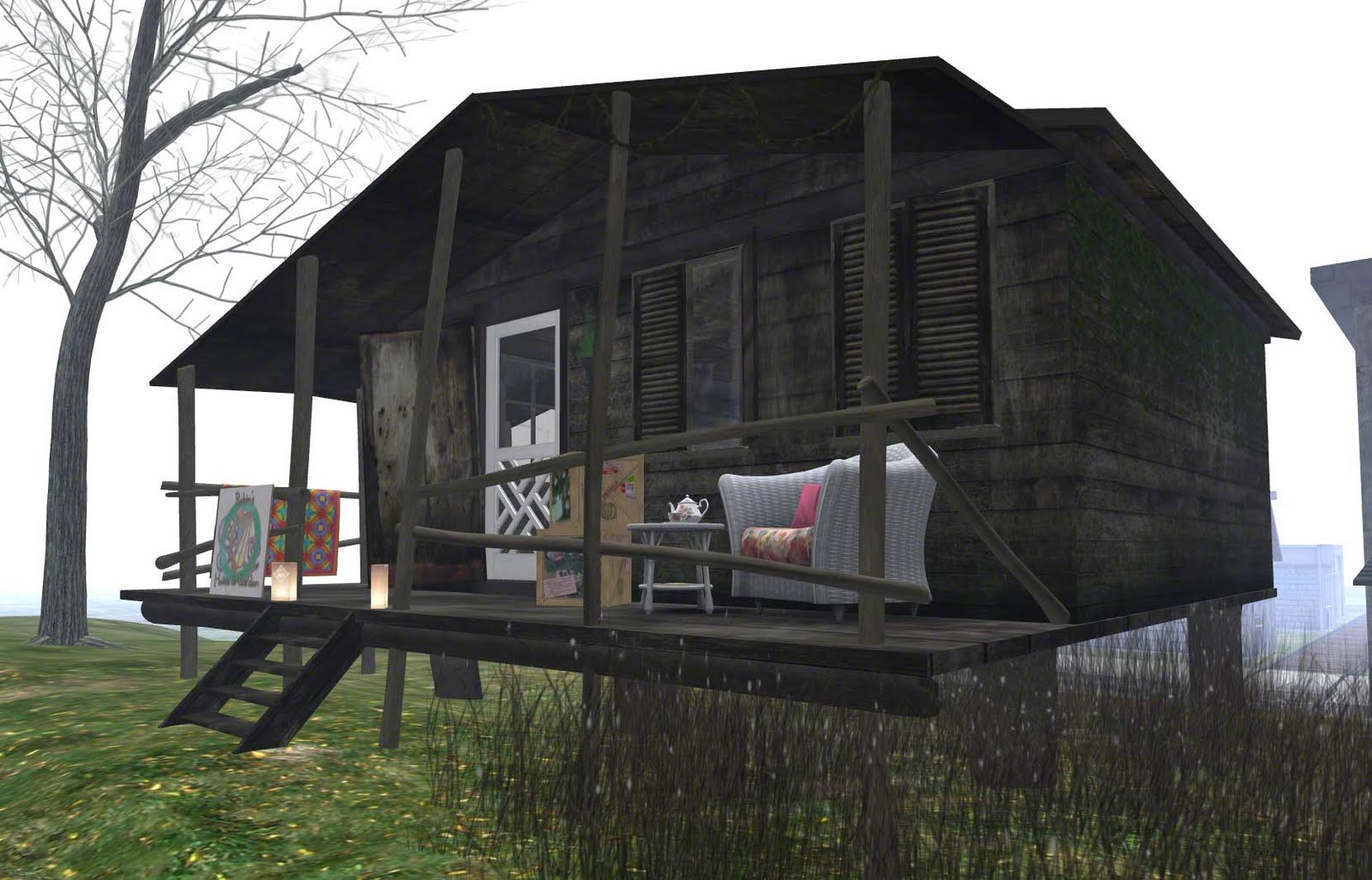
This isn't happening at Livingtree; it's happening at a brand new sim called "The Nest" which is attached to the Cheeky Pea sim. But if you are interested in shopping for your Home and Garden, and interested in Robin's Home and Garden store, then you'll want to know this!
The Nest is a home and garden shopping paradise, with all your favorite Home and Garden stores. (Places like the Loft, LISP Bazaar, Theosophy, Clutter, Mud Honey, Thistle Homes, north west, Second Spaces, and many, many more.)
The sim is beautiful, with a main street, some cottages, and a farm and "shacktown" on the wrong side of the rails. I wasn't early enough to get a store on the main street, but I did manage to get one of the shacks! So Robin's Home and Garden Store is right there on the same sim as the Big Names!
I'm very excited about this, and am already starting to get more home and garden stuff done. You can see the "Rail Quilt" I did just for this shop in the picture. (The shack really needed something to brighten it up!)
So come on down to Robin's Home and Garden at the Nest and take a look at my new digs!
The Nest is a home and garden shopping paradise, with all your favorite Home and Garden stores. (Places like the Loft, LISP Bazaar, Theosophy, Clutter, Mud Honey, Thistle Homes, north west, Second Spaces, and many, many more.)
The sim is beautiful, with a main street, some cottages, and a farm and "shacktown" on the wrong side of the rails. I wasn't early enough to get a store on the main street, but I did manage to get one of the shacks! So Robin's Home and Garden Store is right there on the same sim as the Big Names!
I'm very excited about this, and am already starting to get more home and garden stuff done. You can see the "Rail Quilt" I did just for this shop in the picture. (The shack really needed something to brighten it up!)
So come on down to Robin's Home and Garden at the Nest and take a look at my new digs!
Subscribe to:
Posts (Atom)